
Skip to main navigation Skip to main content Skip to page footer

Stripe Products

care. share!

Start your Microcommerce with native Typo3-Content-Elements and -Categories

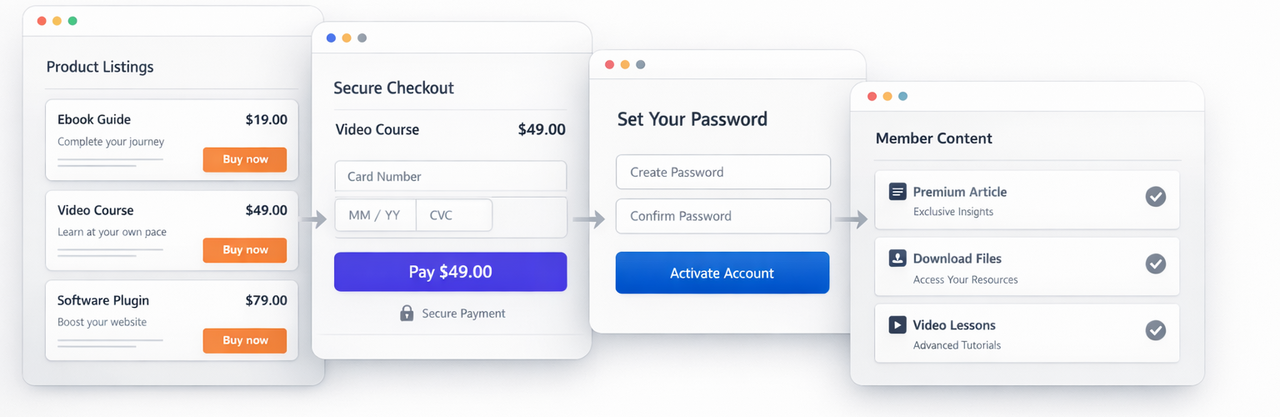
The extension ships with four different Typo3 Content Elements to give you control about your business process and flexibility to create stunning landing pages, funnels and - of course - your member area.

If you need help to configure or install this extension you can book our installservice here.

List View

Show your products by Typo3-Categories or by selected products. For each product you can enter a teaser text, that will appear in List views.

Include a Buy-Button / Details-Button / Category-Menu / product price in your list view or not. Sort your products by price / name.

Product Details

Per default all your product details pages are created automatically. 
Including SEO-friendly slugs, SEO-Titles and SEO-Meta-Descriptions of your choice. 

There is also the option to display a selected product to integrate it smoothly in your website's blog or landing page.

CTA-only

If you choose to create your own landing pages, you can add a large Button with your own button label using the correct payment link.

regular Buttons in Typo3-RTE work as well

Set password

Place this on your payment success / set password page to display the password form. 

developermagic only. 

Good to know

Once a product was created in the backend EVERYONE you send the Payment Link to via messenger / SMS / E-Mail, … will be led through the sign-up process on your website after payment!